I’m on vacation this week and next so I’ll just let you know that if you want a quick overview of SQL Server 2008 R2 Master Data Services there’s a series of 15 minute tutorials on msdev.com. Here’s the link
http://www.msdev.com/Directory/SeriesDescription.aspx?CourseId=155
The Master Data Services team also has a blog with links to even more info.
http://blogs.msdn.com/b/mds/
My next posting should be Sept. 28th.
Tuesday, September 14, 2010
Master Data Services Tutorial

Tuesday, September 7, 2010
Adding Parameter for Analysis Services Data Source in SSRS
I recently need to add a parameter to a report using the Analysis Services Data Source. I didn’t find the process to be straight forward so I’m documenting the steps I took.
7. Go back to the report's design view. Right click on the datasource in the Report Data view and choose show hidden datasets. The EnrolledFromYear dataset will appear and can be edited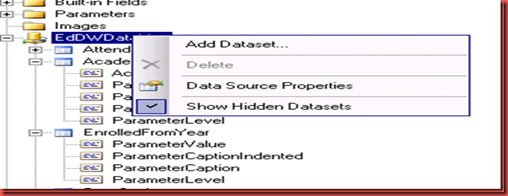
- Go into the query designer’s MDX query mode.
- Click the Query Parameters button on the menu bar.
- Enter parameter, dimension, hierarchy, and default values. Click OK.
- Add the parameter to the query. Click OK.
- I don’t want to give the user the choice of every member in the hierarchy so I have to prevent the parameter from auto updating. To do this switch to the report's code view.
- Find the entry for the parameter’s dataset and add SuppressAutoUpdate
</DataSet> <DataSet Name="EnrolledFromYear"> <Fields> <Field Name="ParameterValue"> <DataField><?xml version="1.0" encoding="utf-8"?><Field xmlns:xsd="http://www.w3.org/2001/XMLSchema" xmlns:xsi="http://www.w3.org/2001/XMLSchema-instance" xsi:type="Measure" UniqueName="[Measures].[ParameterValue]" /></DataField> </Field> <Field Name="ParameterCaptionIndented"> <Value>=Space(3*Fields!ParameterLevel.Value) + Fields!ParameterCaption.Value</Value> </Field> <Field Name="ParameterCaption"> <DataField><?xml version="1.0" encoding="utf-8"?><Field xmlns:xsd="http://www.w3.org/2001/XMLSchema" xmlns:xsi="http://www.w3.org/2001/XMLSchema-instance" xsi:type="Measure" UniqueName="[Measures].[ParameterCaption]" /></DataField> </Field> <Field Name="ParameterLevel"> <DataField><?xml version="1.0" encoding="utf-8"?><Field xmlns:xsd="http://www.w3.org/2001/XMLSchema" xmlns:xsi="http://www.w3.org/2001/XMLSchema-instance" xsi:type="Measure" UniqueName="[Measures].[ParameterLevel]" /></DataField> </Field> </Fields> <Query> <DataSourceName>EdDWDataMart</DataSourceName> <CommandText>WITH MEMBER [Measures].[ParameterCaption] AS [Enrolled From Date].[Academic Calendar].CURRENTMEMBER.MEMBER_CAPTION MEMBER [Measures].[ParameterValue] AS [Enrolled From Date].[Academic Calendar].CURRENTMEMBER.UNIQUENAME MEMBER [Measures].[ParameterLevel] AS [Enrolled From Date].[Academic Calendar].CURRENTMEMBER.LEVEL.ORDINAL SELECT {[Measures].[ParameterCaption], [Measures].[ParameterValue], [Measures].[ParameterLevel]} ON COLUMNS , [Enrolled From Date].[Academic Calendar].ALLMEMBERS ON ROWS FROM [EdDW]</CommandText> <rd:DesignerState><QueryDefinition xmlns:xsd="http://www.w3.org/2001/XMLSchema" xmlns:xsi="http://www.w3.org/2001/XMLSchema-instance" xmlns="http://schemas.microsoft.com/AnalysisServices/QueryDefinition"><CommandType>MDX</CommandType><Type>Query</Type><QuerySpecification xsi:type="MDXQuerySpecification"><Select><Items /></Select><From>EdDW</From></QuerySpecification><Query><Statement>WITH MEMBER [Measures].[ParameterCaption] AS [Enrolled From Date].[Academic Calendar].CURRENTMEMBER.MEMBER_CAPTION MEMBER [Measures].[ParameterValue] AS [Enrolled From Date].[Academic Calendar].CURRENTMEMBER.UNIQUENAME MEMBER [Measures].[ParameterLevel] AS [Enrolled From Date].[Academic Calendar].CURRENTMEMBER.LEVEL.ORDINAL SELECT {[Measures].[ParameterCaption], [Measures].[ParameterValue], [Measures].[ParameterLevel]} ON COLUMNS , [Enrolled From Date].[Academic Calendar].ALLMEMBERS ON ROWS FROM [EdDW]</Statement></Query></QueryDefinition></rd:DesignerState> <rd:AutoGenerated>true</rd:AutoGenerated> <rd:Hidden>true</rd:Hidden> <rd:SuppressAutoUpdate>true</rd:SuppressAutoUpdate> </Query> </DataSet>


7. Go back to the report's design view. Right click on the datasource in the Report Data view and choose show hidden datasets. The EnrolledFromYear dataset will appear and can be edited

Tuesday, August 31, 2010
Sum with empty(null) measures
When I was working on a report I ran into a problem when I tried to sum a measure that contained an empty cell. I expected the empty cells to be treated as zero but that wasn’t the case. The result returned was null. Here’s the sample data.
My first solution was just to apply a filter to remove the empty cell from the set.
The result was still null. I tried a variety of things to remove the empty cells from the calculated measure or transform them into zero but with no success. The result was always the same, null for the sum instead of 94.5.
Consequently I moved away from manipulating the calculated member itself and came up with a solution in a subcube. I was able to remove those cells without an attendance rate from the cube before summing.
| District | Attendance Rate |
| A | (null) |
| A | 0.0% |
| A | 94.5% |
With Member Total AS
SUM(EXISTING(FILTER([Attending School].[District], NOT ISEMPTY(Measures.[Attendance Rate])),Measures.[Attendance Rate])
The result was still null. I tried a variety of things to remove the empty cells from the calculated measure or transform them into zero but with no success. The result was always the same, null for the sum instead of 94.5.
Consequently I moved away from manipulating the calculated member itself and came up with a solution in a subcube. I was able to remove those cells without an attendance rate from the cube before summing.
WITH MEMBER Total AS
SUM(Existing([Attending School].[District]),Measures.[Attendance Rate]))

SELECT Measures.Total ON COLUMNS,
[Attending School].[District] ON ROWS
FROM (SELECT  [Enrolled From Date].[Academic Calendar].[Academic Year] ON COLUMNS,
Filter([Attending School].[District] NOT ISEMPTY([Measures].[Attendance Rate])) ON ROWS
FROM [EdDW])
WHERE [Enrolled From Date].[Academic Calendar].[Academic Year].&[20082009]
Thursday, August 26, 2010
Intro
I'm a MCITP DBA and MCTS in Business Intelligence who's been working with SQL Server for over 10 years, starting as a VB programmer becoming a SQL Analyst graduating to a SQL Developer and finally a SQL DBA. I'm currently employed by Mariner in Charlotte, NC a company specializing in BI where I hope to gain competancy in Analysis Services to add to my SQL portfolio. While I worked with SSIS and SSRS in my former position SSAS was not a direction they wished to go.
I've decided to start this blog with the hope that others can learn from my experiences (good and bad). I plan to post once a week.
I've decided to start this blog with the hope that others can learn from my experiences (good and bad). I plan to post once a week.
Subscribe to:
Posts (Atom)